Money 4 min read

GST and compliance

GST और अनुपालन

Correct GST on every bill, credit notes on refunds, GST and Tally exports, and food-safety records.

हर बिल पर सही GST, रिफ़ंड पर क्रेडिट नोट, GST और Tally एक्सपोर्ट, और खाद्य सुरक्षा रिकॉर्ड।

Updated

Whole guide as PDF

What it does

Every bill shows the right GST: CGST + SGST or IGST, cess, and prices with or without tax.

Refunds make GST credit notes. Export the GST summary, GSTR-1 B2CS, HSN and Tally files for your CA.

Liquor is billed under state VAT, outside GST, on its own VAT invoice. On Swiggy, Zomato and ONDC orders the platform pays the GST (section 9(5)).

Keep temperature logs, hygiene checklists and licence renewals in one place.

Who uses it
OwnerAccountantManager
Which plan
GST bills and GST summary: every plan · Tally and GST exports: Growth and above · Food safety & upkeep: Professional and above
Where to find it
Setup → Profile & GST, Reports & GST, Finance → Exports, Food safety & upkeep
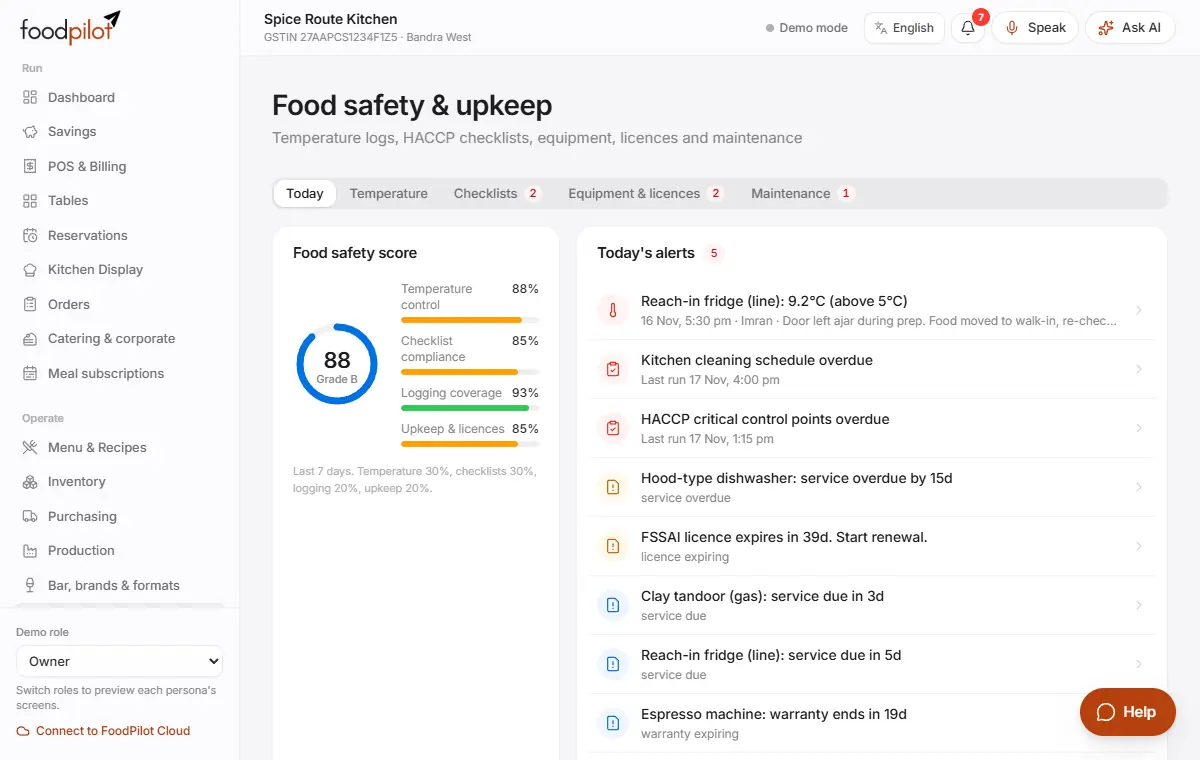
Food safety & upkeep with today's checks, temperature logs and checklists

How to

Set up GST

Setup → Profile & GST

  1. Step 1: Enter your legal name, GSTIN and state in Setup → Profile & GST. The state decides CGST + SGST or IGST.
  2. Step 2: In Setup → Tax rates, check the rates your dishes use.
  3. Step 3: Give each dish a Tax rate in Menu & Recipes.

Get the GST summary

Reports & GST → GST summary → Export CSV

  1. Step 1: Open Reports & GST → GST summary and pick the period.
  2. Step 2: Tap Export CSV and share it with your CA.

Export for Tally and GST returns

Finance → Exports

  1. Step 1: Open Finance → Exports and set the period (This month, Last month or your own dates).
  2. Step 2: Tap Download on Tally XML, Journal CSV, GSTR-1 B2CS or HSN summary.
  3. Step 3: To load the Tally file: in Tally, go to Gateway of Tally → Import → Vouchers.

Bill liquor under state VAT

Setup → Tax rates · Setup → Categories · Settings → Tax

  1. Step 1: In Setup → Tax rates, tap Liquor VAT rate and enter your state's VAT on liquor. The suggested rates are examples: check your state's rate.
  2. Step 2: Turn on Liquor (state VAT, outside GST) for Spirits, Beer, Wine and Cocktails in Setup → Categories. Their dishes move to the VAT rate.
  3. Step 3: With Separate bill for liquor on (default), one payment prints a GST tax invoice for the food and a VAT invoice (liquor, number ending in V). Turn it off only if your state allows one bill with two sections.
  4. Step 4: Discounts and the optional service charge are shared by food and liquor in proportion to their value. Use Finance → Exports → VAT sales register for your VAT return.

Swiggy, Zomato and ONDC orders: GST paid by the platform

Settings → Tax · Finance → Exports

  1. Step 1: Add each platform's GSTIN and your commission % in Settings → Tax.
  2. Step 2: Their orders print "GST paid by Swiggy under section 9(5)" and stay out of your GST payable, B2CS and HSN.
  3. Step 3: Download GSTR-1 Table 14 in Finance → Exports for your return.
  4. Step 4: Check payouts in Finance → Reconciliation → Aggregator payouts: value without GST, minus commission with 18% GST and 0.1% TDS (194-O).

Credit notes

  1. Step 1: A refund from Orders → Refund makes a GST credit note by itself.
  2. Step 2: Find all credit notes in Finance → Credit notes.

Keep food-safety records

Food safety & upkeep

  1. Step 1: Temperature: enter fridge and freezer readings and tap Log. If a reading is out of range, note what you did about it.
  2. Step 2: Checklists: tap Start on the opening, closing, cleaning or HACCP checklist, and Submit when done.
  3. Step 3: Equipment & licences: add your FSSAI and other licences with expiry dates, and record renewals.
  4. Step 4: Maintenance: tap New ticket when something breaks, and Resolve it when fixed.

Tips

  • Check exports with your CA before filing. FoodPilot prepares the data; it doesn't file returns for you.
  • Each device has its own invoice series, so invoice numbers never clash, even offline.
  • Temperature probes can log readings by themselves. See For developers → Temperature sensors.

Common problems

The bill shows the wrong type of GST.
Check the state and GSTIN in Setup → Profile & GST.
Where is the Tally export?
In Finance → Exports, not in Reports & GST.
Can FoodPilot make e-invoices (IRN)?
Not yet. B2B e-invoicing needs a GSP account and is planned.
Liquor shows GST on the bill.
The dish uses a GST rate. Mark its category as liquor in Setup → Categories, or set its Tax type to Liquor (state VAT).
Swiggy orders are missing from GSTR-1 B2CS.
That's correct: the platform pays that GST. They are in Finance → Exports → GSTR-1 Table 14.

Coming soon

  • Full GSTR-1 JSON and GSTR-3B summary
  • E-invoice (IRN) for B2B bills, with a GSP account
  • Licence renewal reminders

Read next

Help articles

The same articles the AI help chat uses. In the app: Help & support → Help articles.

Reports and GST exportsरिपोर्ट और GST एक्सपोर्टRead

Where to find sales and GST reports, and how to export them for your accountant, Tally or the GST return.

GST summary

  1. Go to Reports & GST (owners, managers and accountants).
  2. Pick the period: Today, 7 days or 30 days.
  3. Open the GST summary tab. It lists each tax rate with invoices, taxable value, CGST, SGST, IGST, cess and total tax.
  4. Tap Export CSV to download it.

The same page has Profit & loss, Cash flow, Staff and the Audit trail.

Files for your accountant and the GST return

  1. Go to Finance → Exports.
  2. Choose the file:
    • GSTR-1 B2CS: rate-wise taxable value and tax with place of supply, net of credit notes, in the GST offline tool's column order.
    • HSN summary: HSN/SAC-wise quantity, value and tax (GSTR-1 table 12).
    • GSTR-1 Table 14: Swiggy, Zomato and ONDC orders whose GST the platform pays (section 9(5)), with each platform's GSTIN.
    • VAT sales register (liquor): liquor sales by state VAT rate and the list of VAT invoices.
    • Aggregator payout check: what each platform should pay you after commission, GST on commission and TDS.
    • Tally XML: one sales voucher per day. In Tally, import it with Gateway of Tally → Import → Vouchers.
    • Journal CSV: date, account, debit, credit and narration, for manual journal import into Zoho Books or QuickBooks.

Direct push to Tally or Zoho and GST e-invoicing (IRN) are not available yet; use the export files.

Build your own report

  1. Go to Analytics → Report builder. Pick a measure, group by, date range and filters.
  2. Download with CSV, Excel or PDF, or Pin to dashboard.
  3. Save report, then Schedule to send it by email, WhatsApp or Telegram.

Good to know

  • Refunds create GST credit notes, which are netted off in GSTR-1 B2CS.
  • Liquor (state VAT) and Swiggy/Zomato/ONDC orders (GST paid by the platform) are left out of B2CS and HSN. See "Liquor VAT and Swiggy/Zomato GST".
  • Reports cover bills that have synced. If a device was offline, let it sync first (see "Offline mode and sync").
Liquor VAT and Swiggy/Zomato GSTशराब पर VAT और Swiggy/Zomato का GSTRead

Liquor is billed under your state's VAT, not GST. On Swiggy, Zomato and ONDC orders the platform pays the 5% GST, not you. FoodPilot handles both on bills, the day report and the exports.

Liquor: state VAT, outside GST

Alcoholic liquor for drinking is outside GST (Constitution Art. 366(12A)). Your state charges VAT on it, at its own rate.

  1. Go to Setup → Tax rates and tap Liquor VAT rate. Enter your state's VAT % (and any extra levy). The suggested rates are only examples: check your state's current rate.
  2. Mark your liquor categories in Setup → Categories: turn on Liquor (state VAT, outside GST). The dishes in them move to the liquor VAT rate. You can also set Tax type on a single dish.
  3. The Bar & pub edition marks Spirits, Beer, Wine and Cocktails as liquor for you. Mocktails and bar bites stay under GST.

One payment, two bills

With Settings → Tax → Separate bill for liquor on (the default), a bill with food and liquor is paid once but prints two documents:

  • a GST Tax invoice for the food, with the usual number, and
  • a VAT invoice (liquor) with its own number ending in V, for example SRK01/2627/V0007.

If your state allows one bill, turn the setting off: the bill then shows a GST section and a VAT section.

How amounts are split:

  • A bill discount is shared by food and liquor in proportion to their value.
  • Service charge (optional, only with the guest's consent) is shared the same way. The food share carries GST; the liquor share carries VAT at the liquor's rate.
  • Delivery and packaging charges stay on the GST bill.
  • Each bill is rounded to the rupee on its own.

Reports for liquor

  • GSTR-1 B2CS and HSN summary leave liquor out.
  • Finance → Exports → VAT sales register (liquor) lists liquor sales by VAT rate, minus refunds, and every VAT invoice.
  • The day report (Z report) shows GST and liquor VAT on separate lines.
  • A refund of liquor reverses VAT, not GST.

Swiggy, Zomato and ONDC orders (GST section 9(5))

Since 1 Jan 2022 the platform pays the GST on restaurant food ordered through it. FoodPilot does this for every Swiggy, Zomato and ONDC order:

  • The bill shows "GST paid by Swiggy under section 9(5)". The guest's total doesn't change.
  • That GST is not in your GST payable, GSTR-1 B2CS or HSN summary.
  • Finance → Exports → GSTR-1 Table 14 lists the value of these orders against each platform's GSTIN.

Add each platform's GSTIN in Settings → Tax (from the partner dashboard or its invoices to you). Without it, Table 14 can't name the platform.

If your restaurant is in a hotel that counts as "specified premises", turn on Restaurant is in a hotel in Settings → Tax. From 1 Apr 2025 you charge and pay the GST on these orders yourself.

Check your payouts

Finance → Reconciliation → Aggregator payouts shows what each platform should pay you:

  • order value without GST,
  • minus commission and payment fee, with 18% GST on them,
  • minus 0.1% income-tax TDS (section 194-O),
  • minus GST TCS only on orders where you pay the GST yourself.

Enter your commission % in Settings → Tax. Record each payout to see the difference.

Check with your CA

FoodPilot prepares the data; it doesn't file returns. Ask your CA to confirm: your state's liquor VAT and levy, whether your state needs a separate liquor bill, VAT on the liquor share of service charge, Table 14 and HSN reporting, the ONDC platform that pays the GST, and the TDS/TCS amounts.