Devices & data 2 min read

Plans and billing

प्लान और बिलिंग

Free to start. See your plan, usage and invoices, upgrade, or switch to yearly.

शुरुआत मुफ़्त। अपना प्लान, इस्तेमाल और इनवॉइस देखें, अपग्रेड करें या सालाना प्लान लें।

Updated

Whole guide as PDF

What it does

Five plans: Free, Starter, Growth, Professional and Business. Enterprise is custom.

Free: billing, GST, UPI and offline for one device and 2 logins, up to 50 menu items, 500 saved customers and 30 days of reports. KOT, menu from a photo and AI help answers start on Starter.

New restaurants get 3 months of every module free. No card needed.

See your usage, pay invoices, switch to yearly (two months free) or change plan any time.

Who uses it
Owner
Which plan
Every plan
Where to find it
Sidebar → Billing & plan
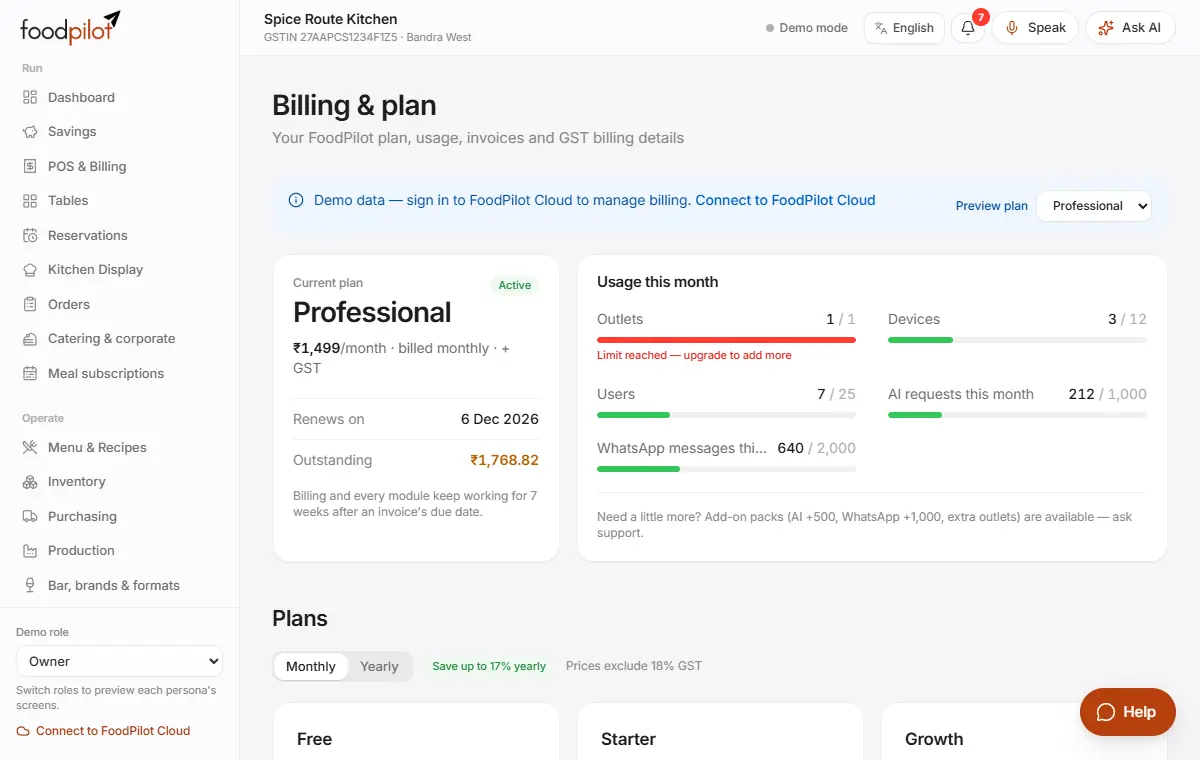
Billing & plan with the current plan, usage this month and the plans

How to

See your plan and usage

Billing & plan

  1. Step 1: Open Billing & plan.
  2. Step 2: See your current plan, when it renews, anything outstanding, and this month's usage against your limits.

Change your plan

Billing & plan → Plans → Upgrade to … → Confirm

  1. Step 1: Under Plans, tap Upgrade to … on the plan you want, then Confirm.
  2. Step 2: You pay only for the rest of the current period.
  3. Step 3: Tap Switch to yearly to pay for 10 months and get 12.

Pay a FoodPilot invoice

Billing & plan → Invoices → Pay

  1. Step 1: Under Invoices, tap Pay. Pay in the Razorpay window.
  2. Step 2: If the window doesn't open, tap Open secure payment page.
  3. Step 3: Tap Print for a copy.

Update your billing details

  1. Step 1: Under Billing details, enter your legal name, GSTIN and invoice email.
  2. Step 2: Tap Save details.

Cancel your subscription

  1. Step 1: Tap Cancel at period end. You keep everything until the period ends.
  2. Step 2: Changed your mind? Tap Resume subscription.

Locked modules

  1. Step 1: Modules your plan doesn't include show a lock in the sidebar.
  2. Step 2: Tap one to see which plan includes it.

Tips

  • Billing never stops. If a FoodPilot invoice is overdue, you have 7 weeks before the account becomes read-only.
  • On Free, going over 1,500 bills in a month or ₹12 lakh of sales in a year never blocks billing. You're asked to upgrade within 30 days.
  • On Free, adding the 51st dish or 501st saved customer shows an upgrade note. Guests can always be billed without being saved, and reports older than 30 days come back after you upgrade.
  • FoodPilot only collects its own subscription fee. Your guests' payments always go straight to you.
  • Export all your data any time, on every plan.

Common problems

It says only the restaurant owner can change billing.
Ask the owner to sign in. Managers can view the plan but not change it.
The payment window didn't open.
Allow pop-ups for foodpilot.org, or tap Open secure payment page.
The demo shows demo billing data.
Sign in to FoodPilot Cloud to manage a real plan.

Read next

Help articles

The same articles the AI help chat uses. In the app: Help & support → Help articles.

Your plan, invoices and limitsआपका प्लान, इनवॉइस और सीमाएँRead

See your FoodPilot plan and usage, change plans, pay invoices and fix "limit reached" messages.

See your plan and usage

  1. Go to Billing & plan (owners and managers; on phones tap More).
  2. Current plan shows the plan, trial or renewal date and anything Outstanding.
  3. Usage this month shows outlets, devices, users and AI requests against your plan's limits (on Free, also menu items and saved customers).
  4. On the Free plan, Current plan also shows your bills this month against the 1,500 limit and your sales this financial year against the ₹12 lakh limit.

Plans and prices

Prices exclude GST. Yearly billing costs about 10 months (two months free).

  • Free ₹0: one outlet, 1 device, 2 users. Billing, GST, UPI, offline billing, orders, menu, day close and reports for the last 30 days. Up to 50 menu items and 500 saved customers. Up to 1,500 bills a month and ₹12 lakh of sales a year (billing never stops). The help chat answers from these help articles.
  • Starter ₹299 a month (₹2,999 a year): no bill, sales, menu or customer limits, and adds KOT to the kitchen (with courses), menu from a photo, AI answers in the help chat, customers, the savings counter, customising and roles. 3 users, 2 devices.
  • Growth ₹699 a month (₹6,999 a year): adds tables, QR order and pay, reservations and online booking, kitchen display, inventory, staff, loyalty and coupons. 8 users, 5 devices.
  • Professional ₹1,499 a month (₹14,999 a year): every module, including AI features (AI assistant, daily briefing, invoice scanning, content studio, price suggestions), purchasing, analytics, catering, bar and WhatsApp e-bills and messaging. 25 users, 12 devices.

AI features start from Professional. Menu from a photo (30 imports a month) and AI answers in the help chat start from Starter. On every plan the help chat finds the right help article, and you can create a ticket.

  • Business ₹3,499 a month (₹34,999 a year): everything for up to 5 outlets with HQ control.

Outside India the same plans are priced in US dollars: Free $0, Starter $19 a month ($190 a year), Growth $39 ($390), Professional $79 ($790), Business $199 ($1,990); Enterprise is custom. The Free plan's sales limit is $15,000 a year instead of ₹12 lakh. Your restaurant's country decides the currency, and invoices to restaurants outside India are in US dollars with no GST. Card payments in US dollars are being switched on; until then Billing & plan shows "Card payments in USD are coming soon — contact us": write to support and we'll help you pay.

New restaurants get a 3-month free trial of Professional, with every module. We email the owner 14, 7 and 1 days before it ends. If no plan is chosen by then, the restaurant moves to the Free plan: nothing is charged and your data stays.

Free plan limits

  • Bills and sales (never stop billing): 1,500 bills a calendar month and ₹12 lakh of settled sales a financial year (April to March).
  • At 80% and at a limit, Billing & plan and a banner suggest upgrading. Over a limit, a banner asks you to upgrade in the next 30 days. Billing never stops: every sale still goes through.
  • When you add things: up to 50 menu items, 500 saved customers, 1 device and 2 staff logins. Adding the 51st dish shows an upgrade message, and imports stop at the limit and say how many were left out. Every dish you already have keeps selling, and guests can always be billed without being saved.
  • Reports show the last 30 days. Older bills are kept safely and show again after you upgrade.
  • KOT: on Free the KOT button says "available on Starter". Billing works as usual: add dishes, tap Pay, then Settle.
  • Menu from a photo: on Free, add dishes from a ready menu, by typing, by voice or from an Excel file. New restaurants get photo import during their free trial.

WhatsApp e-bills

Sending e-bills by WhatsApp or SMS (and WhatsApp reminders, campaigns and the WhatsApp assistant) is on Professional and above. On every plan you can print the GST bill, show the bill QR or copy the e-bill link for the guest.

Change plan

  1. In Plans, choose a plan. Free, Starter, Growth, Professional and Business are listed; Enterprise has custom pricing.
  2. You can switch between monthly and yearly billing.
  3. Only the restaurant owner can change billing.

Modules outside your plan stay visible with a lock. Tapping one shows what it does and how to upgrade.

Invoices and payment

  • Invoices lists FoodPilot's invoices. Tap View to see or print one, and Pay to pay an open invoice.
  • Billing details holds the legal name, GSTIN, state and email used on your invoices.
  • If an invoice is overdue, everything keeps working, billing included, for 7 weeks after its due date. After that the account becomes read-only until it is paid.

"Limit reached" messages

  • Devices: devices not used for 7 days stop counting by themselves. To free a slot now, remove an old device in Settings → Security → Devices, or upgrade.
  • Users: remove logins you no longer need in Staff & payroll → Logins, or upgrade.
  • AI requests: the monthly AI allowance resets at the start of the month. Add-on AI packs or a higher plan raise it. Help articles in Help & support always work.
  • Menu items / saved customers (Free): delete dishes you no longer sell, bill guests without saving them, or upgrade to Starter.

Cancel

Cancel subscription stops renewal at the end of the current period. You can Resume subscription before then.

Open in Help →